GFIXER GP03475 Rubber Buttons Right Garmin Edge Repair 520
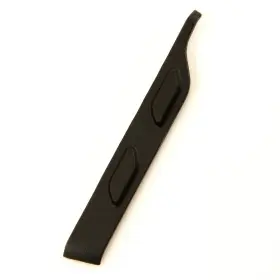
( Brand: Gfixer ), ( Part Type: Button ), ( Manufacturer Part Number: GP03475 )
Review GFIXER Rubber Buttons Right Side Garmin Edge 520 Plus Part Repair
The GFixer GP03475 Rubber Buttons are specifically designed to provide a perfect replacement for the worn-out or damaged buttons on your Garmin Edge 520 cycle computer. These buttons are meticulously crafted using high-quality rubber material to ensure a durable and long-lasting solution for your device.
Each button is precisely engineered to fit perfectly on the Garmin Edge 520, with a design that closely mimics the original buttons in both shape and size. The rubber material used is not only aesthetically pleasing but also provides excellent tactile feedback, ensuring a satisfying click when pressed.
These buttons are easy to install, and no special tools are required for the installation process. Simply remove the old buttons from your Garmin Edge 520, and replace them with the new GFixier GP03475 Rubber Buttons. The new buttons snap securely into place, ensuring a snug and secure fit.
The GFixier GP03475 Rubber Buttons are available in a pack of five, which includes buttons for the start/stop, mode, and up and down buttons on the right side of the Garmin Edge 520. Each button is individually packaged to ensure they remain in pristine condition until you're ready to use them.
In summary, the GFixier GP03475 Rubber Buttons offer a cost-effective and reliable solution for repairing your Garmin Edge 520. The high-quality rubber material ensures a perfect fit, excellent durability, and a satisfying tactile feedback. With easy installation and a pack of five buttons, these replacements are an essential accessory for any Garmin Edge 520 owner.
Buying the GFixer GP03475 rubber buttons for Garmin Edge 520 repair has its advantages and disadvantages. Let's examine each in detail.
Advantages:1. Cost-effective: Replacing the buttons on your Garmin Edge 520 with new ones can save you money compared to buying a new device.
2. Customizable: These aftermarket buttons come in various colors, allowing you to personalize the look of your Edge 520.
3. Improved functionality: The new buttons may offer improved tactility and responsiveness, enhancing your user experience.
Disadvantages:1. Potential fitment issues: While the buttons may be advertised as compatible with the Garmin Edge 520, there is a chance they may not fit perfectly or function optimally.
2. Risk of damaging the device: Attempting to replace the buttons yourself could potentially damage your Edge 520 if not done correctly.
3. Quality concerns: Aftermarket parts may not be of the same quality as original Garmin parts, leading to potential issues down the line.
In conclusion, while purchasing the GFixer GP03475 rubber buttons for Garmin Edge 520 repair can save you money and offer customization options, it also comes with potential fitment issues, the risk of damaging your device, and quality concerns. Weighing these pros and cons, it's important to consider if the potential benefits outweigh the risks.
If you're comfortable with the risks and have experience with device repair, purchasing the aftermarket buttons may be a viable option. However, if you prefer a guaranteed fit and high-quality replacement parts, it's recommended to consider contacting Garmin's customer support for official repair services.
Details:
Employ a plastic tool to peel off the old rubber layer from button. Allow it to set for 24 hours ensure optimal adhesion and curing. Position the button carefully and press firmly to bond rubber plastic base. Apply adhesive evenly across the prepared surface to ensure strong adhesion and a waterproof seal.
The front part of the case is made up a plastic base with rubber layer on top. Wipe the surface clean using ethyl alcohol. For enhanced adhesion, apply a primer such as LOCTITE SF 770. LOCTITE 454 is recommended.
Avoid getting it wet. Use a knife to carefully slice through the rubber layer. Spare part: Rubber buttons for Garmin Edge 520 right part - choose an option, BACK.
specifications gpsgrimmy:
- brand: Gfixer
- part type: Button
- manufacturer part number: GP03475
payments gpsgrimmy:
- credit card: Discover
- other
- wallet: Google-pay
seller gpsgrimmy:
- # reviews: 41
- city: Cary, North Carolina
- rating: 100.0%
returns gpsgrimmy:
- paid by: Buyer
- time: 30 Days
- method: Money back
- policy: Returns Accepted
offer gpsgrimmy:
- quantity: 8
- best offers: True
- sold: 0
- availability: In Stock
- started: July 3, 2025
- options: Ship-to-home
shipping gpsgrimmy:
- cost: $5.33
- class: Standard, Expedited
- type: Calculated
- carrier: USPS
- transit: 7-13 Days
- service: USPS Ground Advantage, USPS Priority Mail
general gpsgrimmy:
- Vehicle Electronics GPS > GPS Accessories Tracking > Other GPS Accs Tracking
- condition: New
Gfixer GP03475 Is Similar To:
- Gfixer Gp03027 Used Rubber Cap Antenna Garmin Rino 110 120 130 Part Repair (62.3% similar) Necessary tools. Compatible with: garmin Ringo 110, 120, 130...(June 19th, 2024)
- Gfixer Gp03288 Used Rubber Cap Usb Garmin Edge 520 820 Part Repair Cover (65.8% similar) A screwdriver for plug replacement. Necessary tools: compatible with: garmin edge 520, 520 plus, 820, explore 820. Material: reinforced rubber waterproof and flexible. Spare part: rubber cap USB for garmin edge 520...(July 24th, 2024)
- Gfixer Gp03339 Rubber Buttons Right Side For Garmin Virb Elite Part (77.8% similar) The front part of the case is made up a plastic base with rubber layer on top. Avoid getting it wet. Congratulations. Compatible with: garmin verb, verb elite. Wipe the surface clean using ethyl alcohol. Lactate 454 is recommended. Position the button carefully and press firmly to bond...(July 25th, 2024)
- Gfixer Gp03284 New Rubber Power Button For Garmin Edge 1000 Explore Repair Part (69.2% similar) Wipe the surface clean using ethyl alcohol. Congratulations. Position the button carefully and press firmly to bond rubber plastic base. Lactate 454 is recommended. Avoid getting it wet. Apply adhesive evenly across the prepared surface to ensure strong adhesion and a waterproof seal...(July 25th, 2024)
- Gfixer Gp03113 Used Rubber Top Cap Antenna Garmin Astro 220 Part Repair (62.2% similar) Compatible with: garmin Astor 220. Complexity level: 4 level 4 - moderate difficulty, involves disassembling the case. Necessary tools...(July 25th, 2024)
- Gfixer Gp03405 New Rubber Power Button For Garmin Edge 1000 Explore Repair Part (70.5% similar) Compatible with: garmin edge 10 explore approach G8. Allow it to set for 24 hours ensure optimal adhesion and curing. Wipe the surface clean using ethyl alcohol. Employ a plastic tool to peel off the old rubber layer from button. The front part of the case is made up a plastic base...(July 25th, 2024)
- Gfixer Gp03332 Rubber Buttons Right Side For Garmin Etrex Rino 650 650t 655t Part (75.9% similar) Wipe the surface clean using ethyl alcohol. Congratulations. Position the button carefully and press firmly to bond rubber plastic base. Employ a plastic tool to peel off the old rubber layer from button. Lactate 454 is recommended. For enhanced adhesion, apply a primer such as lactate...(October 9th, 2024)
- Gfixer Gp03331 Rubber Buttons Left Side For Garmin Rino 650 650t 655t Part Repair (77.2% similar) Avoid getting it wet. Position the button carefully and press firmly to bond rubber plastic base. Compatible with: garmin Ringo 650, 650T, 655T. Use a knife to carefully slice through the rubber layer. Allow it to set for 24 hours ensure optimal adhesion and curing. Wipe the surface clean...(October 9th, 2024)
- Gfixer Gp03380 Rubber Buttons Left Side For Garmin Delta Xc Sport Upland Part Repair (73.3% similar) The front part of the case is made up a plastic base with rubber layer on top. Wipe the surface clean using ethyl alcohol. For enhanced adhesion, apply a primer such as lactate sf 770. Congratulations. Position the button carefully and press firmly to bond rubber plastic base...(October 9th, 2024)
- Gfixer Gp03374 Rubber Sleeve Band With Cable For Collar Garmin T5 Mini Tt15 Spare Part (51.5% similar) Compatible with: garmin 5 mini, tt 15 mini. Necessary tools...(October 10th, 2024)
- Gfixer Gp03376 New Rubber Band For Gps Antenna On Collar Garmin T 5 Tt 10 15 Orange Flexi (49.4% similar) Complexity level: 6 level 6 - moderate difficulty, basic soldering work standard iron, simple components. Compatible with: garmin 5, tt 10, 15, k kt 15...(October 10th, 2024)