GARMIN GP04855 Buttons Edge Repair 830
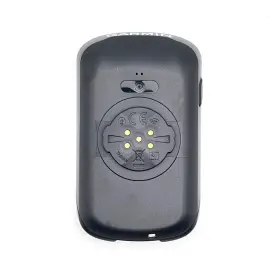
( Brand: Garmin ), ( Part Type: Button Case ), ( Manufacturer Part Number: GP04855 )
Review GARMIN Case Buttons Edge 830 Genuine Replacement Part Repair
The Garmin Edge 830 is a popular GPS bike computer among cyclists, known for its advanced features and sleek design. However, like any electronic device, it may require repairs from time to time, especially when it comes to button issues. If you're experiencing problems with the buttons on your Garmin Edge 830, here's a detailed description of how to repair it.
First, let's identify the issue. If the buttons are unresponsive or not working properly, it may be due to a few common causes such as a dead battery, water damage, or a faulty button. Before attempting any repairs, ensure that the battery is fully charged. If the issue persists, proceed with the following steps.
To repair a faulty button on the Garmin Edge 830, you'll need a few tools and replacement parts. These may include a Phillips head screwdriver, a plastic spudger, and a new button assembly. You can purchase these parts from Garmin's official website or from a trusted third-party seller.
To access the button assembly, follow these steps:1. Power off the device and remove the bike mount from the computer.
2. Unscrew the four screws on the back of the device using a Phillips head screwdriver.
3. Carefully pry open the back cover using a plastic spudger. Be gentle to avoid damaging the device.
4. Locate the button assembly, which is usually located near the bottom of the device.
5. Remove the screw securing the button assembly in place and carefully lift it out.
Once you have access to the button assembly, inspect it for any visible damage. If the button itself appears damaged, replace it with a new one. To install the new button assembly, follow these steps:
1. Align the new button assembly with the socket and press it gently into place.
2. Secure it in place with the screw that you removed earlier.
3. Replace the back cover and screw it back into place.
4. Test the button to ensure it's working properly.
If the button still doesn't work after replacing it, it's possible that there's a more significant issue with the device. In such cases, it's best to contact Garmin's customer support for further assistance or consider sending the device in for repair.
In conclusion, repairing a faulty button on the Garmin Edge 830 can be done with some basic tools and replacement parts. Following the steps outlined above, you should be able to identify and repair the issue, ensuring that your GPS bike computer continues to function optimally.
Garmin Edge 830: To Repair or Replace with a New Garmin GPs 04855 Buttons Edge 830?
Introduction:The Garmin Edge 830 is a popular GPS cycling computer known for its advanced features and durability. However, some users may encounter issues with the buttons, leading them to consider repairing or replacing their device with a new Garmin GPs 04855 Buttons Edge 830. In this analysis, we will discuss the pros and cons of both options to help you make an informed decision.
Repairing Garmin Edge 830: Pros:1. Cost-effective: Repairing your current device can save you money compared to purchasing a new one.
2. Sentimental value: You may have a strong attachment to your current device and prefer to keep it for personal reasons.
3. Familiarity: You are already accustomed to using your current device and its features.
Cons:1. Potential for additional issues: Once a device has been repaired, there is a chance that other components may fail, leading to further repair costs.
2. Wait time: Depending on the repair service, it may take some time to receive your device back.
3. Limited warranty: If the repair does not resolve the issue or causes new problems, you may not be covered by the warranty.
Replacing Garmin Edge 830 with a New Garmin GPs 04855 Buttons Edge 830: Pros:1. Peace of mind: A new device comes with a warranty, ensuring that any issues are covered.
2. Upgraded features: A new device may have improved features or additional functionality that was not available on the previous model.
3. Better performance: A new device may perform better than the repaired one, providing a more enjoyable user experience.
Cons:1. Cost: Purchasing a new device can be more expensive than repairing an existing one.
2. Learning curve: You may need to familiarize yourself with the new features and interface of the device.
3. Disposal of old device: You will need to find a responsible way to dispose of your old device.
Conclusion:Both repairing and replacing your Garmin Edge 830 have their advantages and disadvantages. Repairing can save you money and keep your sentimental attachment to the device, but it may not be a long-term solution. On the other hand, purchasing a new Garmin GPs 04855 Buttons Edge 830 offers peace of mind, improved performance, and potentially upgraded features. Ultimately, the decision depends on your personal preferences, budget, and the severity of the issue with your current device. If the issue is minor and the cost of repair is relatively low, repairing may be the best option. However, if the issue is significant or the repair cost is high, purchasing a new device might be a better investment in the long run.
Recommendation:Based on the information provided, if the issue with the Garmin Edge 830 is minor and the cost of repair is reasonable, it may be worth considering repairing the device. However, if the issue is significant or the repair cost is high, it might be a better investment to purchase a new Garmin GPs 04855 Buttons Edge 830 with improved features and performance. At the end of the day, the decision should be based on your individual needs, budget, and the severity of the issue with your current device.
Details:
Spare part: Back case for Garmin Edge 830. Necessary tools. Compatible with: Garmin Edge 830.
part #: gp04855 price
- $27.95
specifications gpsgrimmy:
- brand: Garmin
- part type: Button Case
- manufacturer part number: GP04855
payments gpsgrimmy:
- wallet: Paypal
- credit card: Visa
- other
seller gpsgrimmy:
- rating: 0.0%
- city: Cary, North Carolina
- # reviews: 0
returns gpsgrimmy:
- method: Money back
- policy: Returns Accepted
- time: 30 Days
- paid by: Buyer
shipping gpsgrimmy:
- class: Standard, Expedited
- cost: $4.33
- transit: 4-9 Days
- type: Calculated
- service: USPS Ground Advantage, USPS Priority Mail
- carrier: USPS
offer gpsgrimmy:
- options: Ship-to-home
- availability: In Stock
- best offers: True
- sold: 0
- started: February 23, 2025
general gpsgrimmy:
- condition: New
- Vehicle Electronics GPS > GPS Accessories Tracking > Other GPS Accs Tracking
Garmin GP04855 Is Similar To:
- Garmin Gps-60 Gps 60 Inch For Parts Or Repair Only Does Not Power On Read Below (34.4% similar) Some scratches on the screen. Garmin handheld GPS personal navigator. Color: yellow. Unit will not power on with batteries. Best offers: if you submit a offer that is accepted, it automatically becomes sale and cannot be retracted. Please send photographs that show the damage to both...(June 18th, 2024)
- Garmin 760lm Gps Model Rv 7 Inch Screen With Bluetooth Car Charger (38.6% similar) It comes equipped with Bluetooth and a car charger for added convenience. Whether you're on a road trip or just commuting, this GPS will guide you to your destination with ease...(June 19th, 2024)
- Garmin Nuvi 1n9245447 Gps Navigator With United States Map Coverage 3.5 Inch (33.8% similar) Toys hobbies. Pottery glass. This product has no manufacturers warranty. Specialty services...(June 19th, 2024)
- Garmin 010-00717-20 Nuvi 255 Wt Gps Navigation System With Charge Cable And Base (36.7% similar) Garmin nevi 255 wt GPS navigation system w/ charge cable base...(June 19th, 2024)
- Gfixer Gp03027 Used Rubber Cap Antenna Garmin Rino 110 120 130 Part Repair (28.9% similar) Necessary tools. Compatible with: Garmin Ringo 110, 120, 130...(June 19th, 2024)
- Garmin 145-01795-00 Front Case For Collar Dc 50 Genuine Part Repair Used Dc50 Battery Cover (48.5% similar) Compatible with: Garmin dc 50. Necessary tools. Complexity level: 4 level 4 - moderate difficulty, involves disassembling the case...(June 19th, 2024)
- Garmin Nuvi-65lmt Nuvi 65 Lmt Gps Navigation System Unit With Mount No Power Supply (33.1% similar) Needs to be updated. Garmin nevi 65 Lt GPS - navigation system unit only w/ mount no power supply. See pictures for details. Pre-owned in good condition with surface wear on outer edges...(June 20th, 2024)
- Garmin 010-01186-00 Zumo 390lm Gps With 1 1 2 Inch Universal Bar Mount (32.4% similar) Part number: 010-01186-00. This Garmin sumo 390LM was previously installed on a 2013 Yamaha super tenure XTZ1200. This listing only includes that which is shown in the photos above. Universal fit for 1/1 /2 handlebars. This GPS unit is in good condition with average wear, including light...(June 20th, 2024)
- Garmin Nuvi-57lm Nuvi 57lm 5 Inch Vehicle Gps With Car Charger Tested works 2 Stands (29.6% similar) The Garmin nevi 57LM is a 5 vehicle GPS that comes with car charger, two stands, and has been tested confirmed to be in working condition. Tested works 2 stands included small stand unused larger used lifetime maps need to update sold as is. It is compatible with Garmin devices and was...(June 20th, 2024)
- Garmin 23f178704 Nuvi 1490 5 Inch Widescreen Bluetooth Portable Gps With Car Charger Bundle (29.6% similar) The map may have to be updated current but not included. Garmin nevi 1490 5 widescreen Bluetooth portable GPS with car charger bundle Sn: 23F178704 all comes as seen in the pictures of items listing for sale, and no other accessories are not included. The used battery not warranted...(June 24th, 2024)
- Garmin 0100240600 Tread Powersport Off-road Navigator With Group Ride Radio (32.7% similar) Huge selection: tens of thousands products in electronics, office, photo, furniture, appliances, computers, and many more. With tread/ fist mic/ vhf antenna/ antenna mount kit/ power cable/ trim ring USB cable. With group ride voice communications...(July 11th, 2024)

1 offer $27.95 USD
- New. Offer #1 priced at $27.95 + $0.00 delivery = $27.95* total. FREE SHIPPING